For subscribers only

OraGol PRO Exchange

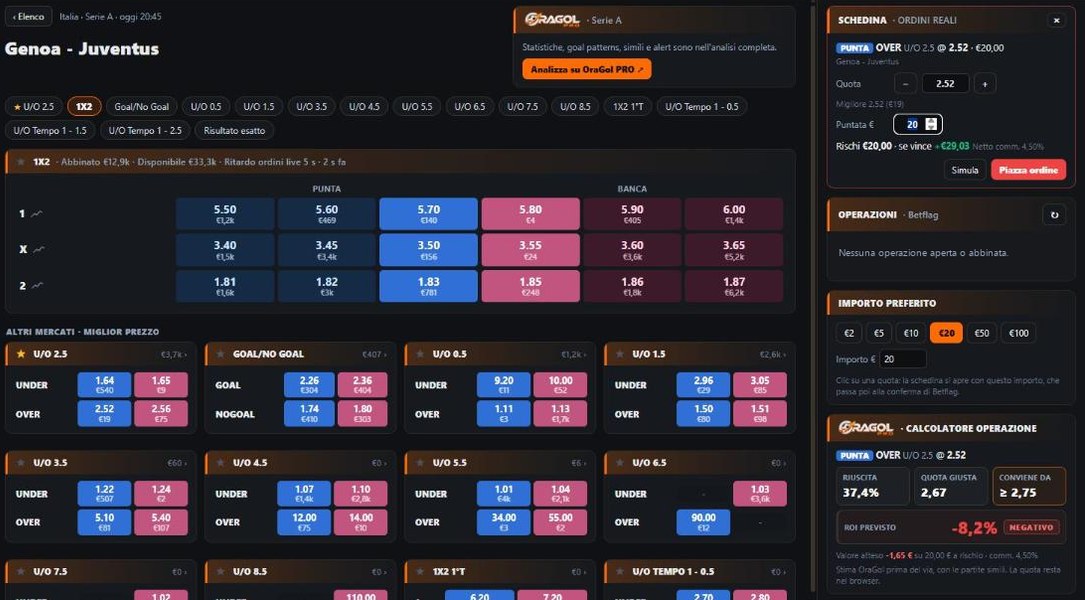
OraGol PRO analysis inside the Betflag football exchange: odds, OraGol data, calculator and trades in a single interface, in your Chrome.

Install from Chrome Web Store How to install

Works with Google Chrome on a computer (Windows or macOS). Not available on smartphones or tablets.

The OraGol PRO Exchange interface: match, back and lay odds, bet slip and trade calculator

How to install

Four steps and the exchange opens with the OraGol PRO interface.

1

Add to Chrome

Open the Chrome Web Store link with Google Chrome and press Add to Chrome.

2

Log in to OraGol PRO

Log in to oragolpro.com with your account: the extension uses the same login. You need an active paid subscription (the free trial does not include the extension).

3

Open the exchange

Go to betflag.it/exchange: the OraGol interface covers the whole page. If you are not logged in to Betflag, their login window appears.

4

Keep OraGol in view

At the top right of Chrome press the puzzle icon (Extensions), then the pin next to OraGol PRO - Exchange. The icon stays in the toolbar: click it to see whether your subscription is active.

Optional

What you get

Everything you need to analyse and trade, without jumping from one tab to another.

Match lists with OraGol data

Today's and tomorrow's matches with the best back and lay odds, RT pressure and OraGol alerts next to every match.

Match page

Every market with 3-level odds, the live match chart and the volumes of every selection.

OraGol box

RT pressure and active alerts for the match, and the button to open the full analysis on OraGol PRO.

Trade calculator

Click a price: estimated success rate, fair odds, the odds from which it pays off and expected ROI, commission included.

Multi-selection bet slip

Every click on a price adds a line, with its own odds and stake and the result of every outcome. One confirmation per market.

Dutching

Several outcomes of the same market with a single amount, total or maximum liability, split automatically.

Trades

Your matched and unmatched offers, Cancel, P&L and cash out on every market next to the match.

Single-outcome cash out

With several outcomes open, exit just one: the extension works out how much to back or lay.

Notifications and followed markets

Matched offer, new OraGol alert, cash out thresholds; markets with the ★ always in view on the left.
From a match page on OraGol PRO, the Open on Betflag Exchange button takes you straight to the same match on the exchange.

Orders and security

An extension working on the page of your account has to be careful: here are the rules.

No automatic orders

The interface opens with real orders, but every order and every cash out is placed only when you press CONFIRM in the Betflag window. Always check market, selection, odds and stake.

Credentials stay safe

You log in to your Betflag account in their own window: the extension never reads or stores your username, password or session codes.

Your data stays yours

Odds, offers and positions of your account stay in your browser: they never reach OraGol PRO.

Website check

If Betflag changes its website, the extension notices and suspends real orders by itself until it is updated. You can always use the original page with the Pagina Betflag button.

To try it risk-free, click ORDINI REALI (real orders) at the top and switch to SIMULAZIONE (simulation): simulated orders never reach the exchange.

Frequently asked questions

I see the normal Betflag page, without the OraGol interface
Make sure you are logged in to oragolpro.com with an active paid subscription and that you have accepted the updated Terms (the OraGol icon in the Chrome toolbar shows the status), then reload the exchange page. If a notice appears at the bottom right, it tells you why.
"ORDINI REALI SOSPESI" (real orders suspended) appears
Betflag has changed something on its website. We notice too and update the extension as soon as possible; in the meantime, trade from the original page ("Pagina Betflag" button).
Some matches have no OraGol data
OraGol PRO does not cover every competition (cups, for example): in that case the match stays on the exchange without the OraGol box.
Why does the stake go up in steps of €0.50?
On the Betflag exchange the minimum stake is €0.50 and stakes go up in steps of €0.50 (0.50 · 1.00 · 1.50 …): Betflag rejects any other amount. The bet slip warns you before sending and, when you leave the field, rounds to the nearest step; dutching stakes are also split in steps of €0.50.
Are the P&L and cash out figures the official ones?
They are indicative. The data of your Betflag account is what counts.
Can I use it on my phone?
No: Chrome extensions only work on computers.
Is the interface in English?
The extension interface is in Italian, like the Betflag exchange it works on.

Ready to start?

Install the extension, log in to OraGol PRO and open the exchange: the interface does the rest.

Install from Chrome Web Store Back to OraGol PRO