OraGol PRO Exchange: OraGol analysis inside the football exchange
Anyone who trades on an exchange knows the problem: the odds page on one side, match data, calculator and notes on the other. You keep jumping between tabs exactly when you should be looking at one thing only. OraGol PRO Exchange was built for this: it is a Google Chrome extension that opens the Betflag football exchange with the OraGol PRO interface, so analysis and trading live on the same page.
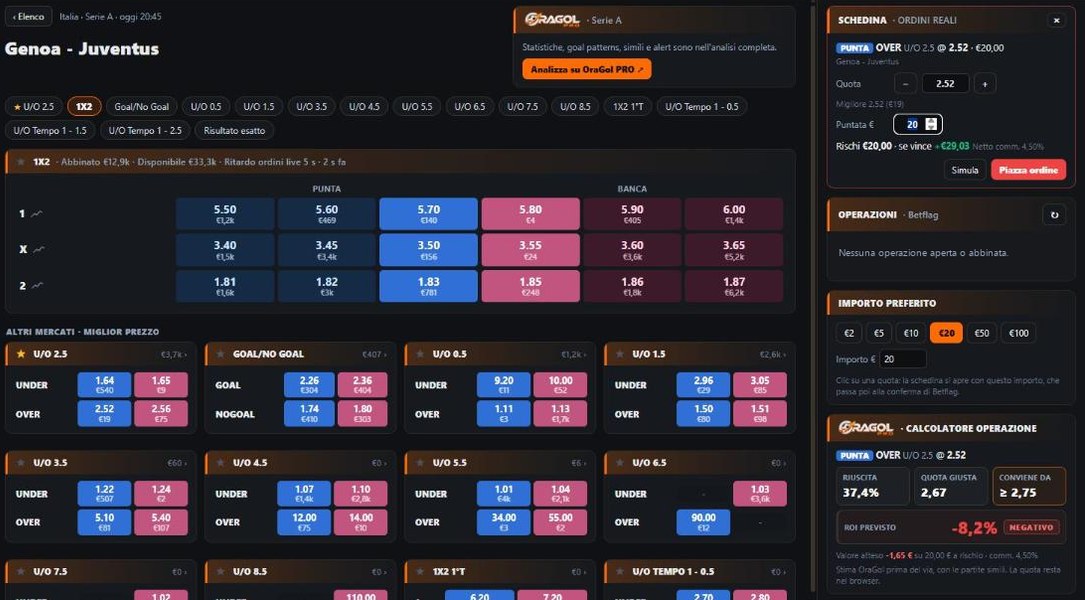
What you get
- Today's and tomorrow's matches with the best back and lay odds and, next to them, OraGol data: RT pressure and active alerts.
- Match page with every market, 3-level odds, the live match chart and the volumes of every selection.
- Trade calculator: click a price and see the estimated success rate, the fair odds, the odds from which the trade pays off and the expected ROI, with the same engine as the OraGol PRO calculator.
- Multi-selection bet slip: every click on a price adds a line, with the result of every outcome. With dutching you type a single amount and it is split across the selections.
- Trades: matched and unmatched offers, cancel, P&L and cash out on every market, even on a single outcome.
- Notifications: matched offer, new OraGol alert, cash out threshold reached; the markets you follow always stay in view.
From a match page on OraGol PRO, the Open on Betflag Exchange button takes you straight to the same match inside the extension.
Security: what it does and what it doesn't
An extension working on the page of your betting account has to be careful. The rules are simple:
- No automatic orders. Every order and every cash out is placed only when you press CONFIRM in the operator's bet slip. The extension prepares the slip and double-checks odds and stake: if they don't match, it stops.
- Your credentials stay yours. You log in to your account in the operator's own window: the extension never reads or stores your username, password or session codes.
- Your account data stays in your browser. Odds, offers and positions are processed only on your computer and never reach the OraGol PRO servers.
- If the operator changes its website, the extension notices and suspends real orders by itself until it is updated. You can always go back to the original page with one click.
Who can use it and how to install it
The extension is reserved to OraGol PRO subscribers with an active paid subscription (the free trial does not include it) and works with Google Chrome on a computer, Windows or macOS.
- Open the extension page on the Chrome Web Store and press Add to Chrome.
- Log in to oragolpro.com with your account: the extension uses the same login.
- Open the football exchange: the OraGol interface opens by itself.
All the details, with frequently asked questions, are in the extension guide.
OraGol PRO is not affiliated with, authorised or sponsored by Betflag; the trademarks mentioned belong to their respective owners. The values shown (P&L, cash out, estimates) are indicative: the data of your account with the operator is what counts.
Discover OraGol PRO Exchange
Full guide, requirements and FAQ: everything you need to get started.
Read the extension guide